Made for indie authors
We make your author website. You keep writing.
Paste your Amazon author page link and your site is ready in minutes, with your books, covers and bio on it. No designer, no plugins, nothing to break.
- No credit card needed
- Free plan, no time limit
- Real person answers email
Not on Amazon? We'll show you how to sign up and add your books yourself.
Start without Amazon- Your books, already thereCovers, blurbs and your bio come in from Amazon.
- A buy button for every storeAmazon, Apple Books, Kobo and more, on every book.
- Nothing to update or fixNo plugins, no updates. Your site keeps working.
- A web address that’s yoursFree at authorpage.me/yourname, or your own domain on Pro.
- To start, no card needed
- $0
- To get your money back on Pro
- 14 days
- Usual wait for an email reply
- 1 day
You wrote the book. The website shouldn’t be a second job.
You already did the hard part. With AuthorPage there are no add-ons or updates to manage. Your site stays put while you write.
The old way
- A site that got worse when you tried to fix it
- Hours of tutorials, or paying someone to do it
- A ‘free’ site that turns out to cost money
- Nobody to ask when something goes wrong
The AuthorPage way
- We handle the updates, so you don’t have to.
- Your books, covers and bio brought in for you
- Free to start. The limits are written down.
- Email Sekar. A real person answers.
Three steps. Take as long as you like.
Your first version can be ready in about 5 minutes. Nothing goes public until you press Publish.
- Step 1
Paste your Amazon link
Open any of your books on Amazon and click your name. Copy the web address at the top of the screen and paste it into the box at the top of this page. No Amazon page? Add your books by hand instead.
Paste your link at the top of the pageAuthorPage finds the author on Amazon and pulls in all four of her books, with covers. - Step 2
We build your site
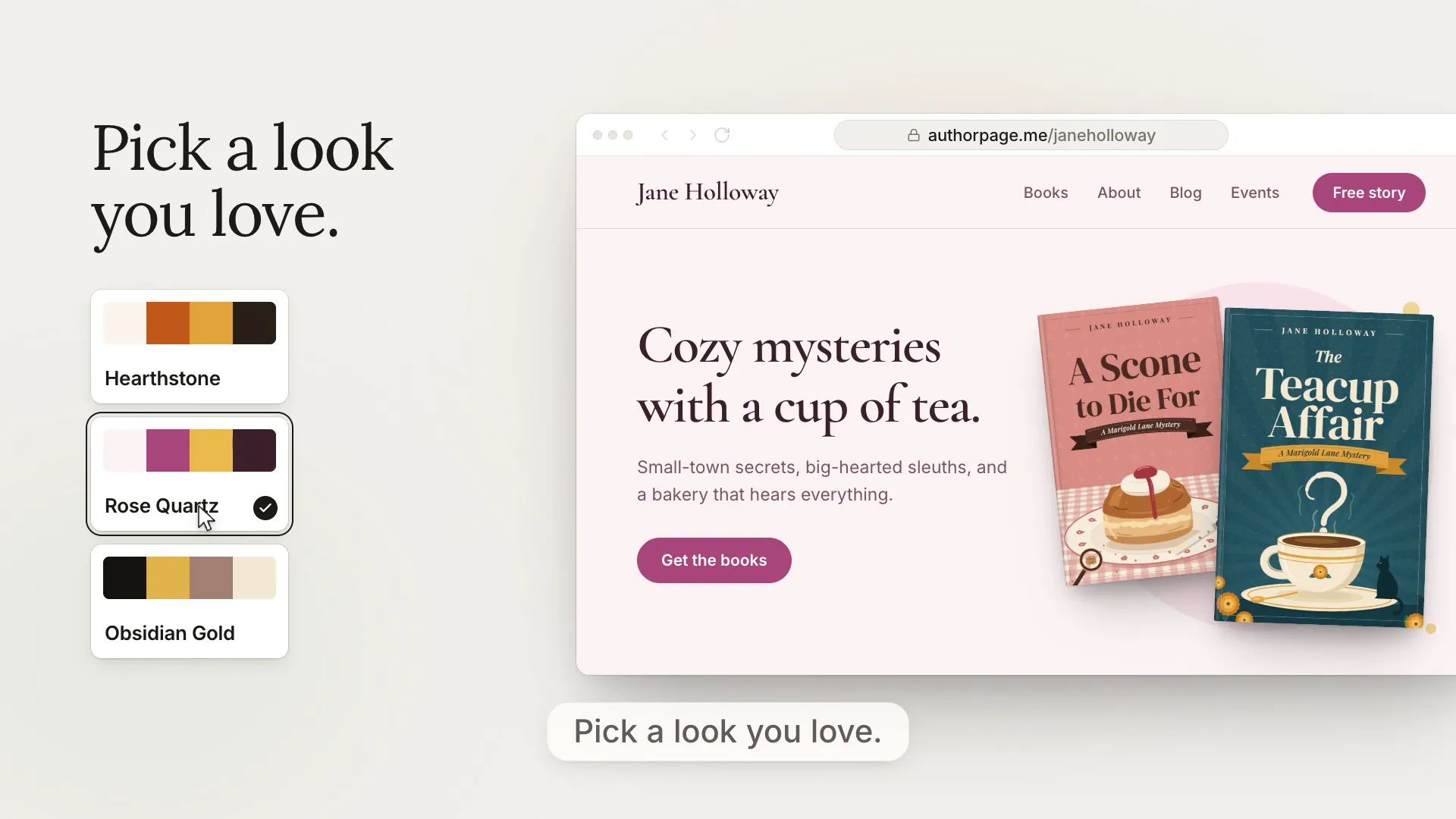
Your covers, descriptions and bio come across for you. Pick one of three starting designs, made from your own books.
Three ready-made designs built from the author's books. She picks The Bookshelf and continues. - Step 3
Make it yours, then publish
Change colors and fonts if you like. Add links to the stores where you sell and a newsletter signup. When you're happy, press Publish to put it online. Your free site lives at authorpage.me/yourname.
The author hits Publish and her site goes live at authorpage.me/mayalinden.
What you get.
What you can forget.
Everything a reader needs to find your books and stay in touch. Nothing for you to look after.
- Nothing to maintain
Nothing for you to keep fixing.
We keep your site online, safe and backed up. There are no add-ons or updates to manage, so there’s nothing for you to keep fixing. If anything ever looks wrong, tell Sekar and he’ll help you sort it out.
- Real help
Chat or email. We’ll help.
Chat with us from your dashboard, or email Sekar, who built AuthorPage. It works the same on the free plan and on Pro. Emails usually get a reply within one business day. We’ll help you set up and connect your own web address.
- All your books
Every book in one place.
Your books sit together, with series grouped in order. Each one links to every store where you sell.
Make it look like your books
Pick a color and a font. You see your page change as you go. No code.
Also included: a simple blog, a contact form (so readers can write to you without seeing your email address), an events page, space for reader praise, and visitor stats.
A real person built this. A real person answers.
Hi, I'm Sekar. I built AuthorPage after watching indie authors lose weeks to WordPress when they'd rather be writing. Most authors only need one simple place where readers can find their books and join their newsletter.
That's all this is. If you get stuck, write to me.

Sekar
Made AuthorPage
- Indie at heart
- No investors to please. Tools made for authors.
- Yours to keep
- Your books and reader emails are yours. Download your list anytime.
- Real help
- Email sekar@authorpage.me, or use the chat in your dashboard. I usually answer email within a day.
“If you get stuck, write to me. A real person will answer. That person is me.”
How AuthorPage compares
WordPress can do more. AuthorPage is simpler, on purpose.
Built for one job: helping readers find your books.
Setup time
How long to get online
- AuthorPage
- About 5 minutes
- WordPress
- Hours or days
Cost
What you pay
- AuthorPage
- $0 or $99/year
- WordPress
- $5-30/month
Your books
Getting books on your site
- AuthorPage
- Brought in for you
- WordPress
- You type them in
Upkeep
Work you do each month
- AuthorPage
- None
- WordPress
- Updates and fixes
Newsletter
A way for readers to sign up
- AuthorPage
- Included
- WordPress
- Needs an add-on
Skills needed
What you need to know
- AuthorPage
- None
- WordPress
- A fair bit
Made for books
Built for authors?
- AuthorPage
- Yes
- WordPress
- No
Free to start. Pro when you want your own web address.
Free gives you 10 books, 10 blog posts, 250 newsletter readers and 100 messages from readers. No credit card and no time limit. Pro is $99 a year and removes the limits.
Free
Start hereNo credit card needed.
Everything you need to get your author website online.
Start free- Your books brought in from Amazon, or added by hand
- Up to 10 books
- Up to 10 blog posts
- Up to 250 newsletter readers
- Up to 100 messages from readers
- Every design, color and font
- Looks right on phones and tablets
- Helps readers find you on Google
- Visitor stats, with 30 days of history
- Sell your ebooks yourself through Payhip (we take 0%)
- Your address: authorpage.me/yourname
- Help from a real person, by chat or email
- Not included: Your own web address (yourname.com)
Pro
That's about $8.25 a month. Save $20 over paying monthly.
No limits, and your own web address.
Start Pro- Everything in Free
- Your own address, like yourname.com
- Unlimited books, posts, readers and messages
- Visitor stats, up to 12 months of history
- Your emails to Sekar answered first
- Try new features first
- No credit card for Free
- No contracts
- No hidden fees
- Cancel anytime
- 14-day money back on Pro
You buy your own web address (like yourname.com) from a company such as GoDaddy or Namecheap. It usually costs $10 to $15 a year and isn't part of the Pro price. We help you connect it.
If you reach a free limit, nothing you already have is deleted. You just can't add more until you make room or upgrade. At 250 readers or 100 messages, new signups and new messages are turned away.
On both plans, you can chat with us from your dashboard or email Sekar, who built AuthorPage. However you reach us, we'll help. Emails usually get an answer within one business day, and Pro emails are answered first.
Cancel anytime from your dashboard in one click. No email, no questions. Pro stays on until the end of the time you paid for, then your site moves to Free and stays live. Nothing is deleted. Pro has a 14-day money-back guarantee. Cancel within 14 days of paying and you get a full refund automatically.
Questions authors ask
Questions from authors, with plain answers. Don't see yours? Email me.
Getting started
I'm not technical. Can I really do this? What if I mess it up?
Yes. AuthorPage is made for people who would rather write than fiddle with websites. You don't need to be technical, and there's no code. There are no add-ons or updates to manage, so there's nothing for you to keep fixing. Nothing goes public until you press Publish, and you can change anything afterwards. If something looks wrong, email me and I'll help you sort it out. With an Amazon link, your first version can be ready in about 5 minutes, but take as long as you like. Your site looks right on phones, tablets and computers without extra work.
Is it safe? What do you take from my Amazon page?
We read only what anyone can already see on your public Amazon author page: your books, covers, descriptions, bio and photo. We never ask for your Amazon password. We never touch your Amazon publishing account (KDP), your sales or anything private.
Can strangers see where I live or my email address?
Only what you choose to show. You don't need a photo, and you never need to give a home address. The contact form lets readers write to you without seeing your email address. If you write under a pen name, make one AuthorPage account for each name. Each gets its own site, its own address and its own list of readers.
Do I need an Amazon author page? What if I haven't published yet?
No. You can add your books by hand instead. That works if you sell at Apple, Kobo or Google Play, or if you haven't published yet. You can start with your bio and your look, and add books as they come out. We don't have special pages for upcoming books yet, so for now a book appears once you add it.
Do I need a website if I already have Amazon or Facebook?
Your Amazon page and your Facebook page belong to Amazon and Facebook. A website is a home that's yours. It puts all your books in one place, with links to every store, and lets readers join your email list. It also gives bookstores, libraries and event organizers one link to find you. If your Facebook page works for you, keep it. Many authors use both.
I already have a website and web address. Can I switch?
Yes. On Pro you can use your own web address, like yourname.com. Your books, covers and bio come across from Amazon, so you don't retype them. Your old site stays where it is until you're ready, so nothing is lost while you try AuthorPage. Your web address stays with the company you bought it from, such as GoDaddy or Namecheap. We don't sell web addresses, so we never hold yours. Pointing it at your new site is the last step, and I'll help with it.
Help
Will a real person help me if I get stuck?
Yes, on every plan, free or Pro. Email sekar@authorpage.me. It goes straight to me, Sekar, the person who built AuthorPage. I usually reply within one business day, and I'm glad to walk you through setup or connecting your own web address, step by step. Pro emails are answered first. You can also chat with us from inside your dashboard. However you reach us, chat or email, we'll help.
What can't I do?
You can't add your own code or add-ons, and you can't build fully custom layouts. You can change colors, fonts and the order of your sections. Keeping it simple is also why there are no updates for you to manage. If you want total control, WordPress can do more, but it comes with a lot of upkeep. AuthorPage is simpler on purpose.
Cost
Is it really free? What's the catch?
It's really free. No credit card, and no trial that turns into a charge. The free plan has limits, and they're written down: 10 books, 10 blog posts, 250 newsletter readers and 100 messages from readers. You'll only pay if you want your own web address (yourname.com) and no limits. Pro is $99 a year, or $9.90 a month. I'm one indie developer, and I make my money from Pro accounts.
What if I reach a limit, stop paying or want a refund?
Nothing you already have is deleted. You just can't add more until you make room or upgrade. At 250 readers or 100 messages, new signups and messages are turned away. You can cancel Pro yourself in one click, under Account, then Subscription, in your dashboard. No email, no questions. Pro stays active until the end of the period you paid for, you won't be charged again, and your site stays live on Free. Pro has a 14-day money-back guarantee. Cancel within 14 days of paying and you get a full refund automatically, no explanation needed.
Your books and readers
When I publish a new book, do I have to add it myself?
You can run the Amazon import again anytime to bring in new books. Books already on your site stay just as they are. It's a button you press, so we don't add books on our own. You can also add a new book by hand.
Can readers buy from stores other than Amazon? Can I sell directly?
Yes. Add buy buttons for Amazon, Apple Books, Kobo, Barnes & Noble, Google Play, Audible and more. You can also sell your ebooks yourself through Payhip, a separate online shop. Paste your Payhip link like any store link and checkout opens on your page. AuthorPage takes nothing, though Payhip charges its own fee. AuthorPage isn't a shop, so we don't handle payments, shipping or tax.
How do readers join my email list?
A signup form sits on your site. Readers confirm by email, so your list stays clean. New names can go straight to MailerLite, Kit, Mailchimp, beehiiv, EmailOctopus, ActiveCampaign, Brevo or SendFox. Substack doesn't allow this, so for Substack you download your list as a file you can open in Excel and add it there. We don't send your newsletters. You send them from your own email tool. We only send the confirmation and free-book emails.
Your web address and your things
Do I need to buy my own web address? How much is it?
Only for Pro. Your free site lives at authorpage.me/yourname. For yourname.com, you buy the name yourself from a company like GoDaddy or Namecheap, so it belongs to you. It usually costs $10 to $15 a year, paid to that company. If your name is taken, many authors add "author" or "books" (like janedoeauthor.com). We have a step-by-step guide, and I'll help you connect it if you get stuck.
Who owns my site? What if AuthorPage shuts down?
You own your books, bio, photos, reader emails and posts. You can download your reader list and your messages anytime, and delete your site from your dashboard whenever you like. If AuthorPage ever closes, you'll get at least 90 days' notice, copies of your data and help moving.
Still have a question?
sekar@authorpage.meWrite to me. I read every email and answer it myself, usually within one business day. Already signed up? You can also chat with us from your dashboard.
Let's build your author website.
Paste your Amazon link and see your site in minutes, or start without Amazon. Nothing goes public until you press Publish.
We'll show you how to sign up and add your books yourself, step by step.
No credit card. No time limit on the free plan. A real person to email if you get stuck.